Use the HMRC Starter Checklist[2], which replaced the P46 in 2013. Regulation 36 of the PAYE Regulations 2003[1] only requires P45 issuance once, so neither HMRC nor the previous employer is obliged to reissue; the Checklist's Statement A/B/C selection determines the starting tax code.
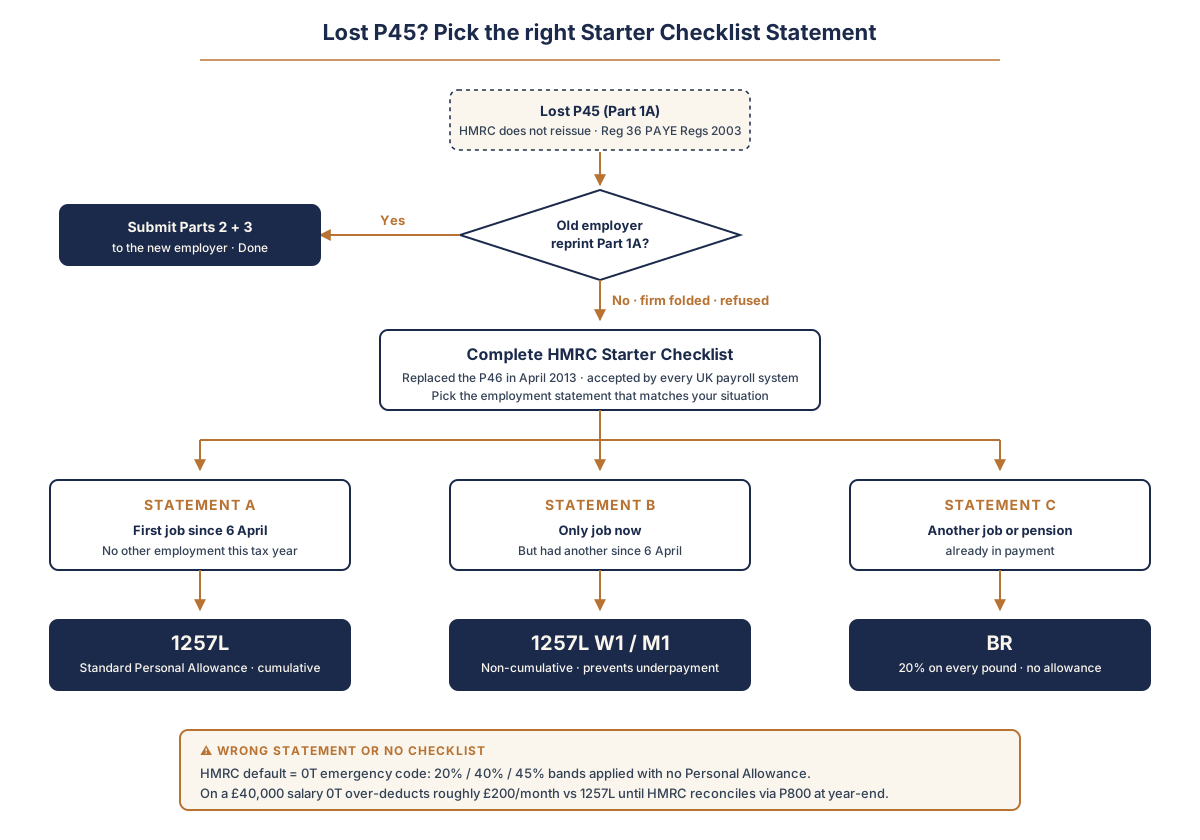
Decision tree for a lost UK P45. Step one: ask the previous employer for a Part 1A reprint. If yes, pass Parts 2 and 3 to the new employer (done). If no, complete the HMRC Starter Checklist. Pick the employment statement: Statement A is for a first job since 6 April and gives tax code 1257L (standard Personal Allowance, cumulative). Statement B is for an only current job after having had another since 6 April and gives 1257L on a Week 1 or Month 1 basis (non-cumulative, prevents underpayment). Statement C is for someone with another job or pension already in payment and gives BR (20% basic rate on every pound, no Personal Allowance). No Checklist or the wrong Statement triggers the 0T emergency code: 20%, 40%, and 45% bands applied with no Personal Allowance, which on a £40,000 salary over-deducts roughly £200 per month versus 1257L until HMRC reconciles via the P800 process at year-end.
What does each Statement give as a tax code?
Statement A (first job since 6 April) gives 1257L, the standard Personal Allowance code, cumulative across the tax year. Statement B (only current job, but had another since 6 April) gives 1257L on a Week 1/Month 1 basis: non-cumulative, applied each pay period in isolation to prevent underpayment. Statement C (another job or pension already in payment) gives BR: 20% basic rate on every pound, no Personal Allowance assumption.
Is the Checklist only for a lost P45?
No. The Checklist is the substitute for any new starter without a recent P45 to hand over. You complete it yourself, on paper or online, not the employer. Common cases:
- A first-ever job, so no prior P45 exists.
- A return to work after a gap, such as after self-employment, study or a benefits claim.
- A second job kept alongside an existing one (Statement C).
- A P45 that arrived late or was lost.
Can I correct a wrong Statement after my first payday?
Yes. Tell your employer or HMRC and a revised code is issued; any over- or under-payment is reconciled, often automatically once the tax year ends. The Checklist also asks separately about student and postgraduate loan plans, so confirm the correct plan before submitting. Check the code on your first one or two payslips against the PAYE Regulations 2003[6] framework the employer runs it under.
What if the wrong Statement was picked or no Checklist submitted?
HMRC's default becomes the 0T emergency code[4], with 20%, 40%, and 45% bands applied to gross pay and no Personal Allowance. On a £40,000 salary, 0T over-deducts roughly £200/month against 1257L, refunded only after the year-end P800 reconciliation. Phone HMRC on 0300 200 3300 quoting the NI number; HMRC issues the corrected code directly to the employer via the Personal Tax Account, usually within one pay period. Fabricating a P45 from old payslip figures (even of real earnings) is a Fraud Act 2006[5] offence; the Checklist exists so this never has to be considered. The replacement P60 guide covers how lenders verify income documents against HMRC records.
In 6 steps
How to Use HMRC's Starter Checklist When a P45 is Lost
Replace a missing P45 by completing the HMRC Starter Checklist correctly: pick the right employment statement, hand it to the new employer, and verify the resulting tax code on the first one or two payslips.
- 1
Confirm with the previous employer that a P45 reprint is not coming
Email or call payroll at the previous job and ask whether a Part 1A reprint is possible. If yes, accept and pass Parts 2 and 3 to the new employer. If no — or the company no longer trades — proceed to the Starter Checklist.
- 2
Download the PAYE Starter Checklist from gov.uk
The form is at gov.uk/guidance/starter-checklist-for-paye. It can be completed on screen and emailed, or printed and signed by hand. The new employer's payroll team will tell you which format they accept.
- 3
Pick the correct employment statement (A, B, or C)
Statement A: this is the first job since 6 April. Statement B: only current job, but I have had another job since 6 April. Statement C: I have another job or pension already in payment. The wrong statement triggers an emergency code and over-deduction, which is recoverable but costs cash flow until reconciled.
- 4
Declare any student loan or postgraduate loan
The Checklist asks separately about student-loan plans (1, 2, 4, 5) and Postgraduate Loans. Identify the correct plan from the Student Loans Company online account before completing — the wrong plan triggers automatic 9% (or 6% for postgraduate) deductions on income above the wrong threshold.
- 5
Hand the completed Checklist to the new employer
Submit before the first payday. Most employers accept the form by email; some require a printed copy. The new employer enters the data into payroll software, which generates the starting tax code based on the chosen statement and applies it to the first payslip.
- 6
Verify the tax code on the first one or two payslips
If the code is 1257L (standard) or BR (basic-rate-only second job) and matches the chosen statement, no further action is needed. If the code is 0T, 1257L W1/M1, or anything unexpected, contact HMRC on 0300 200 3300 quoting the National Insurance number — HMRC issues the corrected code directly to the employer through the Personal Tax Account, usually within one pay period.
Primary sources
- 1.PAYE Regulations 2003, Regulation 36 — legislation.gov.uk — Employer duty to issue P45 when employment ends
- 2.PAYE Starter Checklist — gov.uk — HMRC form replacing the previous P46 — used when no P45 is available
- 3.Tell HMRC about a new employee — gov.uk — Employer guidance for onboarding new starters with or without a P45
- 4.Tax codes (including emergency codes) — gov.uk — How BR, 0T, and W1/M1 emergency codes are applied and reconciled
- 5.Fraud Act 2006 — legislation.gov.uk — Statutory basis for fraud offences arising from document fabrication
- 6.The Income Tax (Pay As You Earn) Regulations 2003 — legislation.gov.uk — SI 2003/2682 — the PAYE framework the new-starter information feeds
Editorial process: how we source and review UK tax content.