UK Payslip · 2026/27 PAYE · NI · Pension
UK Payslip Generator
Professional payslips with PAYE, NI, pension, and student-loan calculations on the current 2026/27 HMRC rates. No app to install, no account required — your data never leaves your browser.
— No app to install · no sign-up · nothing leaves your device.
Proofread free — pay for the final, ready-to-submit PDF
Start generatingIn this section
The itemised pay statement an employer must provide every employee on or before payday under section 8 of the Employment Rights Act 1996. Must show gross pay, every deduction (PAYE, NI, pension, student loan) and net pay.
Payroll
- Payslip GeneratorHMRC-aware PAYE, NI, pension, and student-loan deductions on 2026/27 rates.
- Payslip for Mortgage ApplicationLender-ready payslips for UK mortgage applications — including lost-payslip and sole-director cases.
- Payslip for Company DirectorsPayslips for limited-company directors on salary-plus-dividends, with the correct director NI method.
- P60 GeneratorEnd of Year Certificate — annual pay, tax, NI and student-loan totals on the HMRC 2026/27 substitute-form layout.
- Salary StatementManual entry for mortgage applications, loans, and visa records — you control every figure.
More generators
What this generates
- Monthly UK payslip PDF
- PAYE income tax + Class 1 NI deductions shown
- Pension (salary sacrifice) line items if entered
- Optional student-loan plan deduction
- YTD column on demand
Primary sources
Guides for this document
- Does the India-UK deal remove National Insurance from my payslip?
- How Do I Read a UK Payslip? (2026/27 Anatomy Guide)
- How Does UK PAYE Work in 2026/27? (Worked Example)
- UK Statutory Pay Explained: How Much Are SSP and SMP?
- What Counts as a Qualifying Year for the State Pension?
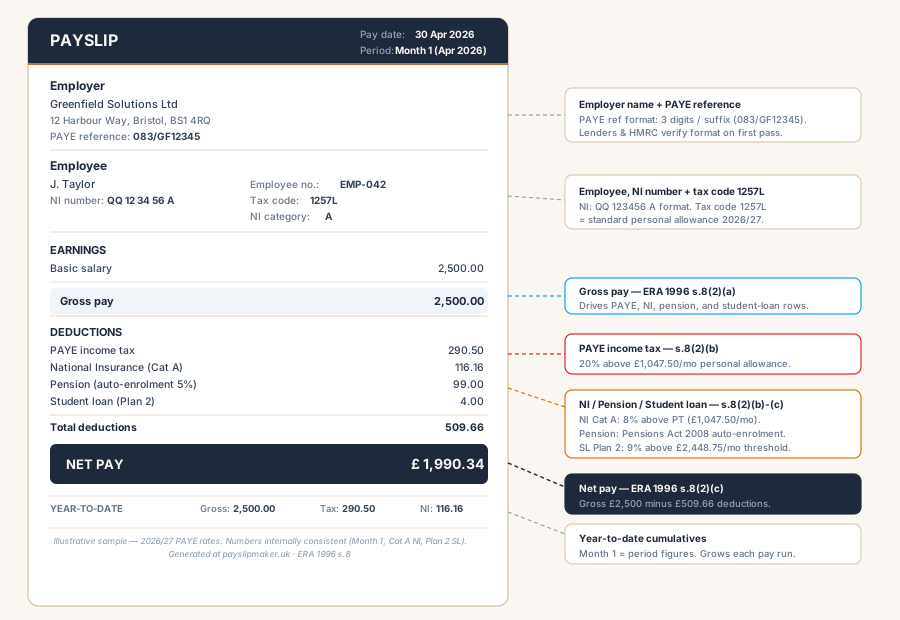
A UK payslip is the itemised pay statement an employer must give every employee on or before payday under section 8 of the Employment Rights Act 1996. It must show gross earnings, every deduction (PAYE, National Insurance, pension, student loan), and net pay. The right was extended to all UK workers — including casual, zero-hours, and agency staff — in April 2019.
Generated in your browser. The PAYE, National Insurance, pension, and student-loan rows are auto-calculated on HMRC’s 2026/27 rates — the same lines an employer reports under Real Time Information. No document data reaches us. A wrong-rate payslip is what triggers an HMRC enquiry; the right rates keep payroll boring.
Using a payslip for a mortgage application, or replacing ones you lost? Lenders verify specific fields differently — see the payslip for a mortgage guide.
Reviewed by Eleanor Whitfield · UK payroll, PAYE & National Insurance
Before you start — what you’ll need
- · Employer name & address
- · PAYE reference
- · Employee name & NI number
- · Pay date
- · Gross earnings (incl. overtime / bonus if any)
- · NI category letter
- · Student loan plan (if applicable)
- · Pension contribution (if applicable)
Employer details
Saves your business details in this browser only — nothing is sent to any server.
Upload your own header image, footer image, and footer text. The payslipmaker.uk site-mark and default footer caption are suppressed in the PDF when this is on. Files stay on your device.
Step-by-step
How to generate a UK payslip
Assemble the employer and employee identifier blocks, set the pay date and frequency, enter gross pay components, pick the NI category and student-loan plan, and generate the PDF with PAYE, NI, pension, and student-loan deductions auto-calculated on HMRC 2026/27 rates.
- 01
Enter the employer block
Company name and address plus the PAYE reference. The PAYE reference follows the format three digits, a slash, then a suffix issued by HMRC (for example 120/AB12345). Lenders and tribunals check this format first when verifying a payslip.
- 02
Enter the employee block
Employee name, address, and the tax code. National Insurance number and employee number are optional but recommended — the NI number field validates against the QQ 12 34 56 A pattern on blur. The tax code drives every income-tax figure below.
- 03
Pick the pay date and frequency
Pay date controls the tax-year-to-date cumulative window. Frequency switches the calculation between weekly, four-weekly, and monthly cycles. Four-weekly produces thirteen pay periods per tax year, not twelve — the generator adjusts the YTD figures accordingly.
- 04
Enter the gross pay components
Basic salary, overtime, bonus, allowances, and any taxable benefits. Salary-sacrifice items reduce the gross before tax. The generator sums these into the gross-pay line that drives PAYE, NI, pension, and student-loan deductions below.
- 05
Pick the NI category and student-loan plan
NI category A is the default. Category M applies to employees under 21, Category H to apprentices under 25, Category C to employees over State Pension age. Student-loan plans (Plan 1, 2, 4, 5, or Postgraduate) deduct 9% (6% for Postgraduate) above the plan threshold. Both stack with PAYE and NI on the gross.
- 06
Generate and download the PDF
Deductions auto-calculate against HMRC 2026/27 rates. The PDF builds in your browser, no data reaches a server. Verify net pay matches gross minus every deduction shown before you hand it to a lender — the arithmetic is the first thing the underwriting system checks.
Updated 2026-05-28
FAQ
UK payslips — common questions
Does this payslip meet the legal requirement for an itemised pay statement?
Are PAYE, National Insurance, pension and student loan worked out for me?
Can I produce a Scottish-rate payslip?
Can I create payslips for several consecutive months?
Is a generated payslip a substitute for payroll software?
References
After you generate
- Your final PDF downloads to your device immediately after payment.
- Nothing uploaded from your browser
- Falcon Verified QR for receiver-attestation — coming soon
- Re-open the form to generate another with the same details
First-timer questions
Will the PDF say "draft" or have a watermark?
The free preview shown on this page is watermarked so you can proofread every figure. The £1.99 PDF is the clean, ready-to-send version with no watermark.
Is this an official HMRC payslip?
No — this is a UK-format payslip you generate yourself for self-employed records, rental applications, or personal accounting. Not an employer-issued P60 or P45.
Where does my data go?
Nowhere. Payslip values stay in your browser; the PDF is rendered client-side.
Can I generate one for a previous month?
Yes — set the pay date to any month you need.